
Case Study · LCP
Policies and Procedures Manager with SharePoint
A Power Apps front end integrated with a SharePoint document library, giving LCP a branded, controlled way to add, categorise, preview and manage company policies and procedures.
- Client
- LCP
- Industry
- Asset Management
- Country
- United Kingdom
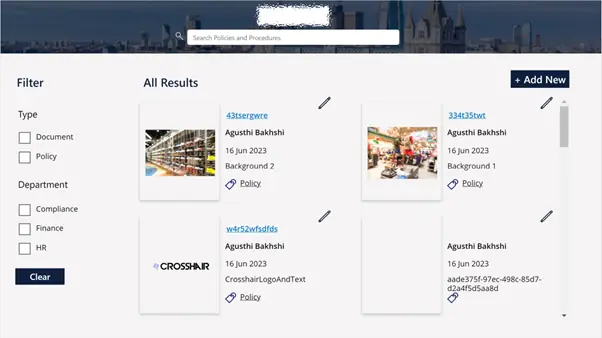
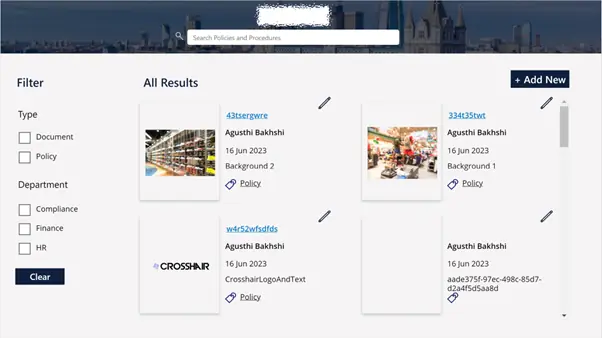
aligned to LCP’s intranet aesthetic
permissioned add and edit access for content owners
first-page document thumbnails for fast browsing
with SharePoint via Power Automate and the REST API
The client wanted an application to effectively manage their company’s policies and procedures from within a SharePoint document library, with controlled permissions, an aesthetic that matched their intranet, and the ability to preview documents before opening them.
Challenge
The client sought an application that would seamlessly support the addition, categorisation, modification and filtering of documents. They required a user-friendly interface that aligned with the aesthetic of their company’s intranet, while also allowing users to preview documents and open them via SharePoint. Additionally, the application needed to incorporate permission controls to manage who could add new items.
Solution
To meet these objectives, Synapx collaborated with a UX designer to craft an intuitive front-end interface. After obtaining client approval on the designs, we developed the front end using Power Apps.
The application was integrated with a SharePoint document library through Power Automate, leveraging SharePoint’s RESTful API. This enabled users to create and update files within the app and preview the first page of each document as a thumbnail.
Result
The resulting solution delivered a sleek, efficient interface for document management, fully integrated with SharePoint. Users gained the ability to interact with documents, adding, categorising and updating them, while the permission settings ensured controlled access for new item additions.
Document previews via thumbnails further enhanced the user experience, making file navigation straightforward and visually engaging.
Could your team benefit from a similar outcome?
Tell us about your goals and we'll show you how Microsoft, Data and AI can help you get there.
Start the conversation